Colonial Flag Foundation
Online training for the thousands of volunteers who partner with CFF each year to plan and execute significant community events.

Colonial Flag Foundation helps community groups and other non profit organizations plan and execute significant community events known as Healing Fields and Fields of Honor. To date they are responsible for more than 840 events that have raised more than $42 million dollars for local charities and touched the lives of more than 50 million people.
Colonial Flag Foundation used to train committee members and volunteers using binders of printed materials and through one-on-one conversations. CFF engaged Education Services to help them modernize the training program, to make it more accessible and scalable so that committee members and volunteers can access it online, at any time, on any device.
The project initially included evaluation of commercial cloud-hosted learning platforms. After extensive review, CFF determined their customers would be best served by seamlessly integrating the training program into their WordPress-based customer portal rather than linking out to a separate commercial platform. Education Services then built a custom learning platform and integrated it into the www.healingfield.org website.
Training content was developed as a collaborative effort. Education Services provided instructional design and learning engineering services, established content authoring best practices, created initial versions of the training modules, and then trained CFF staff so they can perform ongoing maintenance and updates on their own.
Q&A with Paul Swenson
In this video, Paul Swenson, Colonial Flag Founder and CEO, tells about his vision, experience, and recommendations after going through the full training development process with Education Services LLC.
Q&A with Paul Swenson, Colonial Flag Founder and CEO.
[On Screen] Tell us about your original vision for the online committee member training program?
[Paul Swenson] The original vision we had was to make sure we were able to perpetuate what we’re trying to accomplish with each field. There’s different layers of information and training that gets passed down from generation to generation with this, and a lot of it was captured on paper documents, a lot of it was in photographs, and we had a pretty elaborate, thick summary of all that in what we call the Kit Pack. We’d send that out along with the training manual. But it was cumbersome to print, expensive to print, and it wasn’t easy to update and make current.
And so, working with our team and with Education Services, we were able to compile that and condense it, and make it easier for the organizations that we work with to understand the program and to train their committee members more quickly and more effectively.
We rolled it out slowly. We got a few people to sample it, and right now we’re in full force rolling it out nationally as we go through our 2019 programs. We’re excited about it.
[On Screen] Why did you choose Education Services to assist you in the creation of this training program?
[Paul] Education Services came about through a strong referral from a good friend of mine, and we decided to follow up with that and interview them. We realized this was a group that we could trust with something that was very valuable and important to us, something we’d spent years and thousands and thousands of dollars in development. It was a program that has very strong meaning in the community. It’s a program that we hope to one day share with more people. So to help leverage our knowledge base and the collective experience of other people who have already done this event through the training modules that we have now really helped us out, and we appreciate that.
[On Screen] Would you recommend Education Services to other who are looking for assistance creating or modernizing their corporate and professional training for employees or customers?
[Paul] I would recommend Education Services to anybody looking to enhance the professional look of their program. You have content already – most organizations already have that – and now you need to put it together in a way that is easy for people to learn.
It’s not just the structure of the presentation, but it’s the ability, the talent, and the skillset they bring through their great team to teach people. Not everybody is a good teacher. So to be able to have someone that knows how to teach, to help people absorb information, is very important. Not just the aesthetic of the interface.
[On Screen] Do you have any advice for other business leaders who might have a similar vision for their next generation of employee or customer training but don’t know where to start?
[Paul] My advice for others that might consider this is not to wait as long as we did.
We didn’t know about Education Services, or even about anybody similar to Education Services, but I think we waited too long. I wish we would have done this about six or seven years ago, and it would have been something we could already refine, because it has an easy to use interface where we can edit and modify it as we go along, internally. We don’t always have to go to Education Services for updates, although we know they’re always there as a safety net to help pick us up and fix the things that we do wrong on it and train us as we go forward.
We also want to augment it and bring other things in and expand it as we go, but right now we have great core training program and I just wish we’d done this earlier.
I would recommend anybody to start with Education Services. Go compare shop if you want, but you’ll probably come back to Education Services.
[On screen] Visit www.EdSvcs.com to learn more about how Education Services LLC helped Colonial Flag Foundation.
Training Format
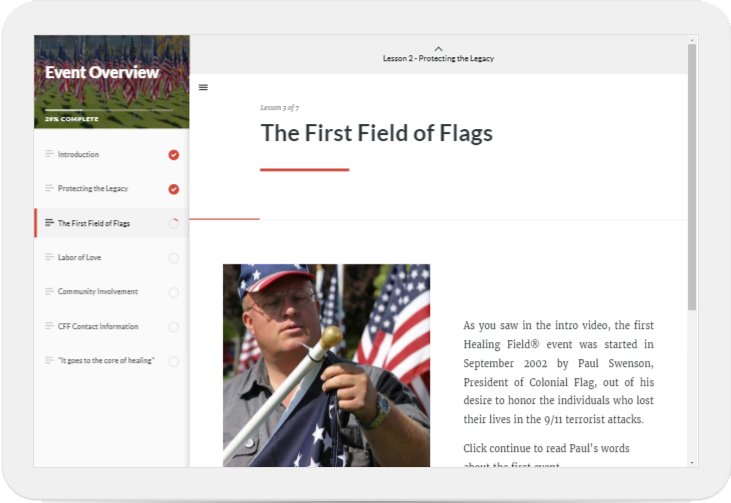
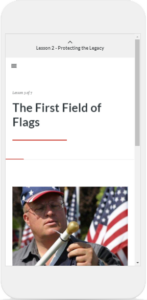
This training program is fully mobile responsive HTML5, meaning the content will reflow to present well on any desktop or mobile device. This allows learners to access the training whenever and wherever it’s most convenient for them.
The online training covers the essential information that each learner needs to know to fulfill their responsibilities, and it is supplemented, as needed, with specific guidance from the Colonial Flag Foundation staff.
Methodology
The development methodology for this project was based on the SAM model and Rapid Prototyping. The process was highly collaborative and iterative, transforming existing pdf training materials and SME knowledge into a straightforward, user-friendly course.
Watch this video to see how our methodology guided this project.
[Narrator] Colonial Flag Foundation is a non-profit that trains thousands of volunteers to put on fundraising events each year.
For years, this training has been done through PDF documents, phone calls, and videos, and it has most often been provided only to the primary contact organizing each event, relying on them to accurately train the rest of the organizing committee and volunteers who plan and execute the event.
Colonial Flag engaged with Education Services to help re-envision the training and deliver it through a modern online learning experience that would enable them to maintain consistent standards while working with increasing numbers of organizing committees and volunteers.
We began with an initial meeting to determine the scope and design approach to improve their training.
For this project, we utilized the Successive Approximation Model, also known as SAM. SAM is a variation of the widely known ADDIE model that uses rapid prototypes and iteration to solidify and deliver the customer’s vision. This model has four phases: preparation, design, development, and rollout.
The preparation phase is used to determine business goals, learning objectives, learner profiles, and other instructional design needs.
The primary audience for this training is comprised of business and government leaders who volunteer as members of the event organizing committees. These are busy professionals with varying backgrounds, which means that the training could not require a particular degree of technological sophistication or prior experience in planning and organizing similar events.
Based on our learner profiles, it was decided that the training needed to be mobile friendly for on-the-go learning, it needed to be in a user-friendly format for volunteers who are not tech savvy, and it needed to be condensed into micro-learning for quick training and for use as a reference.
The project also considered online learning platforms, leading to a decision to implement directly within the existing membership portal.
For this project, the Design phase was focused on the course structure and content, and selection of an appropriate content authoring tool.
We selected Articulate Rise as the authoring tool because it allows us to create user-friendly, mobile-responsive training with interactive elements, and it’s simple enough that after initial delivery their administrative staff could maintain the training content in-house.
In the Development phase, we took advantage of the iterative nature of the SAM model to expedite the design process by skipping traditional storyboarding and instead transferring their existing training content directly into the authoring tool where it was then enhanced with interactivity and active learning techniques.
In-person meetings and use of online review tools allowed Colonial Flag leadership to see our progress, provide feedback, and collaborate directly with us throughout the project. We also trained the Colonial Flag team to use the authoring tool, and they were able to complete the final edits to the training content on their own.
The Rollout phase was focused on implementing the training into a learning platform.
After investigating different cloud-hosted LMS options, we created a custom learning platform directly in the Colonial Flag Foundation membership portal.
We first implemented the platform and performed extensive testing in a sandbox to ensure it worked properly with the training and their website.
This custom learning platform lessens the administrative burden for Colonial Flag and further empowers committee leaders through functionality that automatically adds committee members to all courses, tracks progress, awards certificates upon completion, and allows committee leaders to track the progress of their teams.
User Experience
Transforming the training from compilations of documents into an online program integrated into their existing membership portal has been well-received by both the Colonial Flag Foundation staff and the volunteers they train.
Watch the video to learn more about how this solution works for their trainees, and hear from one of their trainees about her experience.
[Narrator] For this project, the training was built into Colonial Flag Foundation’s existing membership portal. Learners receive an email invitation to complete the training.
The training is accessed directly from the member resource area.
The training modules are organized in a logical fashion and are easy to access. Courses that have been started but not finished are listed first, and clicking Resume will take you right back to where you left off.
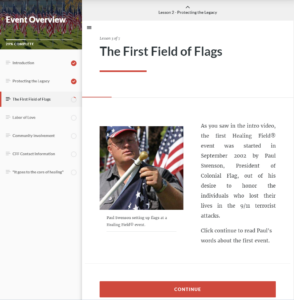
The system is built with a responsive design. This means the layout of the training screen reconfigures depending on the size of the device. On large screens, a menu of the course content is located on the left side by default, which also shows the learner’s progress and highlights the active section. On smaller screens, this menu is hidden by default but can be opened using the hamburger menu button.
The learner can jump to a different section by clicking on the desired section on the menu, or they can move through the training by scrolling and clicking on the appropriate buttons to proceed through the content.
Because the content reformats for the current screen size, no horizontal scrolling is necessary.
The course learning design employs a variety of techniques to keep the training interesting and the learner engaged through rich media and interactive elements.
These elements include:
Videos
Expandable sections
Photo galleries
Example documents
Interactive graphics
A custom cost calculator
And more
All of these interactions work on desktop and mobile.
Once the course is complete, the learner has access to a printable certificate that serves as proof of completion. The certificate is automatically sent by email and can be accessed in the learning platform.
Group leaders can monitor the progress of their committee members.
Let’s hear from one of the trainees about her experience with the training.
[On Screen] What benefit did the training provide to you?
[Trainee Karen Paris] The training program benefited me as the Volunteer Chair, because it gave me some ideas of things that I could do better, and there were some things that I hadn’t even thought of until I saw the different videos and watched other people put up their fields.
[On Screen] How easy is the training to use?
[Karen] It was very easy. In fact, I started it on my tablet. I was able to log out, then I think I finished it using my smart phone. So I used two different devices, and it was just so easy to access. And I was able to get my certificate and actually email the certificate to myself.
Examples From The Training
Several examples from the actual training course are included below. Contact us for a guided demonstration.